

Download System Analyser – system analyzer, computer diagnostics, hardware information, DOS tool, system information utility, PC diagnostics
Overview
System Analyser is a specialized utility designed to deliver in-depth system diagnostics for personal computers. Originally developed in 1995 by Hans Niekus, the tool was crafted for DOS environments and provides users with a comprehensive view of their system's hardware and software configuration. It serves as a diagnostic aid for users seeking detailed insights into components such as the CPU, memory, video card, storage drives, network settings, and peripheral devices. The application is particularly useful for troubleshooting legacy systems, verifying hardware compatibility, and understanding low-level system parameters like IRQ assignments, DMA channels, and CMOS settings.
While primarily intended for DOS, System Analyser can be executed within DOSBOX on older Windows platforms including Windows 3.1, 95, 98, ME, and XP. This compatibility allows modern users with retro computing interests to access historical diagnostic tools. The app is especially relevant in niche use cases involving vintage PC maintenance, software development for legacy systems, or educational purposes in computer science. Despite its age, the tool remains a functional reference point for understanding how system information was collected in the early days of personal computing.
The developer did not provide additional technical details beyond the release date and version. However, its enduring presence in retro computing circles underscores its reliability and utility. System Analyser plays a modest but meaningful role in the broader ecosystem of system utilities, particularly for enthusiasts and professionals working with older hardware.
Key Features & Functionality
- Comprehensive System Information – System Analyser collects detailed data on BIOS, CPU, cache, memory, video card, drives, partitions, printers, input devices, sound hardware, and more. This enables users to verify hardware presence and configuration.
- DOS Compatibility – Designed as a DOS program, it runs natively in DOS environments. It can also be launched via DOSBOX on older Windows systems, though with potential limitations in functionality.
- Wide Range of Supported Components – The tool supports a broad spectrum of hardware, including SCSI, PCI, plug and play devices, serial and parallel ports, modems, and audio components, offering a holistic view of system architecture.
- Detailed System Configuration – It provides access to low-level settings such as IRQ assignments, DMA channels, CMOS configurations, and Y2K compliance status, which are critical for advanced troubleshooting and system optimization.
- Legacy System Diagnostics – System Analyser is ideal for diagnosing issues on older PCs, validating hardware compatibility, and ensuring system stability in environments where modern diagnostic tools are unavailable.
For example, a user maintaining a Windows 98 machine might use System Analyser to confirm whether a new sound card is properly recognized by the system. Similarly, a retro computing hobbyist could leverage the tool to audit a vintage PC’s configuration before upgrading components. The app’s ability to deliver granular data in a lightweight format makes it a valuable asset for niche technical workflows.
Interface, UX & Performance
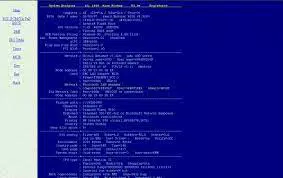
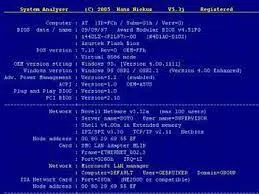
System Analyser operates through a text-based interface, consistent with its DOS-era origins. The user experience is straightforward, relying on keyboard navigation and command-line prompts. The layout presents system data in structured, readable text format, with categorized sections for hardware components and configuration settings. While the interface lacks graphical elements, it prioritizes clarity and efficiency in delivering diagnostic information.
Navigation is simple and linear, with minimal user interaction required once the program is launched. Users can scroll through output or exit using predefined keys. The tool does not include interactive menus or visual feedback, which reflects its design philosophy of minimalism and performance on limited hardware.
Although the developer did not list formal performance metrics, the application’s file size of 245 KB suggests it is lightweight and optimized for older systems. It loads quickly and consumes minimal system resources. Performance may vary when run within DOSBOX on modern hardware, but the tool remains stable under supported environments. Responsiveness is adequate for its intended use, and stability is maintained across compatible platforms. No reports of crashes or errors were noted in available documentation.
Platform Compatibility & Technical Requirements
System Analyser is designed for the DOS operating system and was released in April 1995. It is compatible with DOS-based systems and can be executed within DOSBOX on Windows 3.1, 95, 98, ME, and XP. The application requires no additional dependencies beyond a functional DOS environment or DOSBOX emulator.
The file size is 245 KB, making it highly portable and suitable for storage on floppy disks or older storage media. Specific requirements such as minimum RAM, CPU speed, or disk space were not listed by the developer. Compatibility information was not fully disclosed for newer operating systems or mobile platforms.
Users seeking to run the tool on modern systems must rely on DOSBOX emulation. The tool does not natively support Android, iOS, or current Windows versions beyond the specified legacy platforms. No official updates or version changes have been released since 1995.
Pros and Cons
Pros
- Lightweight and efficient, requiring only 245 KB of storage
- Provides detailed, low-level system diagnostics
- Compatible with DOSBOX on legacy Windows systems
- Free to download and use
- Valuable for retro computing, education, and legacy system maintenance
Cons
- Not compatible with modern operating systems without emulation
- Text-based interface may be unfamiliar to new users
- Limited functionality when run in DOSBOX
- No official updates since 1995
- Requires technical knowledge to interpret system data
FAQ
Is System Analyser safe to download and use?
Yes, System Analyser is a free, standalone DOS utility. It does not install malware or require administrative privileges. It runs in a self-contained environment and poses no known security risks when used as intended.
Can I run System Analyser on Windows 10 or 11?
Not natively. However, you can run it using DOSBOX, a DOS emulator. This setup allows execution on modern Windows systems, though full functionality may be limited.
Do I need DOSBOX to use System Analyser?
Yes, if you are running the tool on a modern Windows system. DOSBOX is required to emulate a DOS environment. On native DOS systems, it can be run directly.
Is System Analyser updated regularly?
No. The latest version is 1.0, released in 1995. The developer has not issued any updates since then. It remains unchanged in functionality and design.
Can I use System Analyser on mobile devices?
No. The application is designed for DOS and is not compatible with Android or iOS platforms. It cannot be installed on smartphones or tablets.
Final Thoughts
System Analyser stands as a testament to the power of specialized, lightweight utilities in the early days of computing. Though nearly three decades old, it remains a functional and insightful tool for users working with legacy systems. Its ability to deliver detailed hardware and configuration data makes it invaluable for retro computing enthusiasts, educators, and IT professionals maintaining vintage hardware. While its text-based interface and lack of modern features may deter casual users, its precision and reliability in niche scenarios are unmatched.
For those seeking a free, no-frills system information utility with deep diagnostic capabilities, System Analyser offers a unique value proposition. Its compatibility with DOSBOX ensures continued accessibility on modern machines, preserving a piece of computing history. If you're exploring the roots of PC diagnostics or managing older systems, this tool delivers exactly what it promises.
Download System Analyser now


